6 Club login OTP not received: what to check, in order
The one-time password is the step that fails most often at sign-in, and it nearly always fails for an ordinary reason: a weak signal, a filtered message, a mistyped number or too many requests in a row. Working through the causes in a fixed order gets most people in within a few minutes.
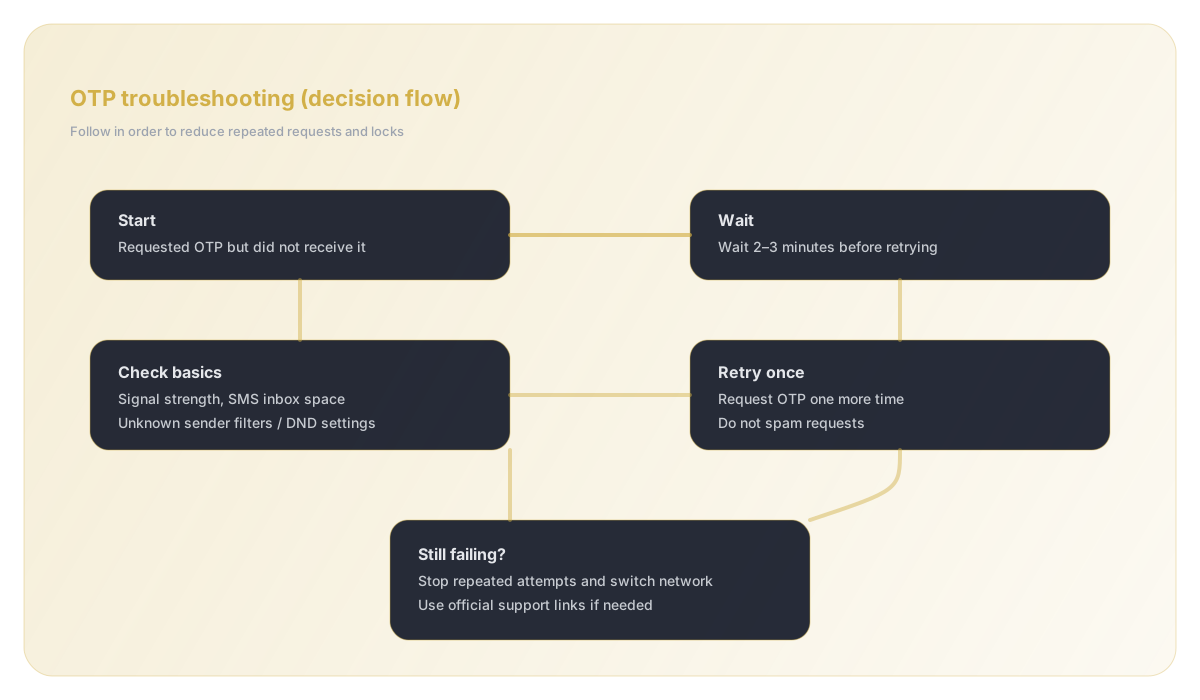
Quick answer
Wait for the full resend timer, confirm the number and country code are exactly the ones on your account, make sure the SIM has signal and can receive texts from unknown senders, then request one fresh code and type it before it expires. If several requests fail, stop for a while: repeated requests can trigger a temporary block that only time clears. Use password login if you set one, and contact in-app support only after these checks.
Why a login code goes missing
An OTP travels from the platform's messaging provider, through your mobile operator, to the SIM in your phone. A delay or block at any of those three points looks the same from your side: the screen is waiting and nothing arrives. That is why guessing rarely helps and a checklist does.
Operator-side delays are common in the evening and during festivals, when message volumes spike. Phone-side problems usually involve the SIM being in the wrong slot, airplane mode, a full message inbox or a spam filter quietly moving the text to a folder you never open. Account-side problems are the ones people least expect: a number entered with an extra digit, a different number from the one used at sign-up, or a short lockout after too many attempts.
The checks, in the order that saves time
Do these one at a time and request a new code only after each change, not after every few seconds. Every extra request resets the queue and increases the chance of a temporary block.
- Let the resend countdown finish completely before asking again.
- Read the number back digit by digit, and check the country code. It must match the number you registered with, not your newest SIM.
- Check signal: one bar is often not enough for an SMS. Move near a window or switch from Wi-Fi calling to the mobile network.
- On dual-SIM phones, confirm which SIM holds the registered number and that it is enabled for messages.
- Look in the spam, promotions or 'unknown senders' folder of your messaging app; many Android phones filter short-code senders automatically.
- Clear space if your phone warns that message storage is full.
- Restart the phone once. It re-registers the SIM with the network and clears stuck message queues.
- Request a single fresh code and type it promptly; codes expire, and an older code will not work once a newer one has been sent.
When you have tried too many times
Login systems protect accounts by slowing down repeated attempts. If you have requested several codes or entered the wrong one a few times, the app may stop sending codes for a while, or accept the code but still refuse the login. This is protection, not a fault, and support usually cannot lift it any faster than simply waiting.
Step away for a reasonable period, then try once with all the checks above already done. If the app offers password login and you have a password set, use that instead; it does not depend on SMS at all. If you have forgotten the password, the reset flow will also send an OTP, so fix the delivery problem first.
| What you see | Most likely cause | What to do |
|---|---|---|
| No SMS at all, first attempt | Signal, SIM slot or SMS filter | Check signal and spam folder, then retry once |
| SMS arrives late, code rejected | Code expired or a newer code was sent | Use only the most recent code, type it quickly |
| Nothing after several requests | Temporary request limit | Wait, then try once; use password login if set |
| Code accepted, login still fails | Wrong account number or a lockout | Confirm the registered number; contact in-app support |
If your registered number has changed
If the account was opened with a number you no longer have, codes will keep going to that old SIM. No amount of retrying fixes this. You will need the platform's support team to confirm you own the account and update the number, which normally means answering questions about the account and recent transactions.
Prepare your user ID if you have it, the old number, the new number, and details of a recent deposit such as the date, amount and transaction reference. Contact support only through the app or the official channels it links to; anyone who contacts you first offering to move your account to a new number is not support.
Keeping the code safe
An OTP is the key to your account for a few minutes. Type it only into the app's own login screen, never into a website reached from a link in a message, and never read it out to anyone on a call. Genuine support staff never ask for it.
If you received a code you did not request, someone may be trying to sign in with your number. Do not share it, change your password from inside the app as soon as you can log in, and keep an eye on your transaction history.
Still locked out?
The login guide covers password sign-in, resets and device problems in more detail. If you have done every check here and waited out any lockout, raise a single ticket with in-app customer care and include your user ID, registered number and a screenshot of the error.
Frequently asked questions
How long should I wait for a 6 Club login OTP?+
Give each request until the resend timer finishes. Delivery is usually quick, but busy network periods can add delay. Requesting again before the timer ends only adds to the queue.
Why is my OTP rejected even though I typed it correctly?+
The code has probably expired, or a newer code was sent after it. Only the most recent code is valid. Request one fresh code and enter it promptly.
Can support send me the OTP another way?+
Support does not read out login codes. They can help confirm your registered number or account ownership, but the code itself must arrive on your phone.
Does using Wi-Fi stop SMS codes from arriving?+
SMS travels over the mobile network, not Wi-Fi. If your signal is weak, the message may not arrive even though the app itself works fine over Wi-Fi.
I got an OTP I didn't ask for. What now?+
Do not share it. Someone may be trying to log in with your number. Change your password from inside the app and watch your account activity.